

YouTube is the largest video platform and offers us affiliates some interesting opportunities to advertise for free. When used correctly, YouTube can even prove to be a more effective traffic source than some paid advertising platforms.
Looking at YouTube's recent user base, it becomes clear that finding ways to advertise on the platform can be a smart move:
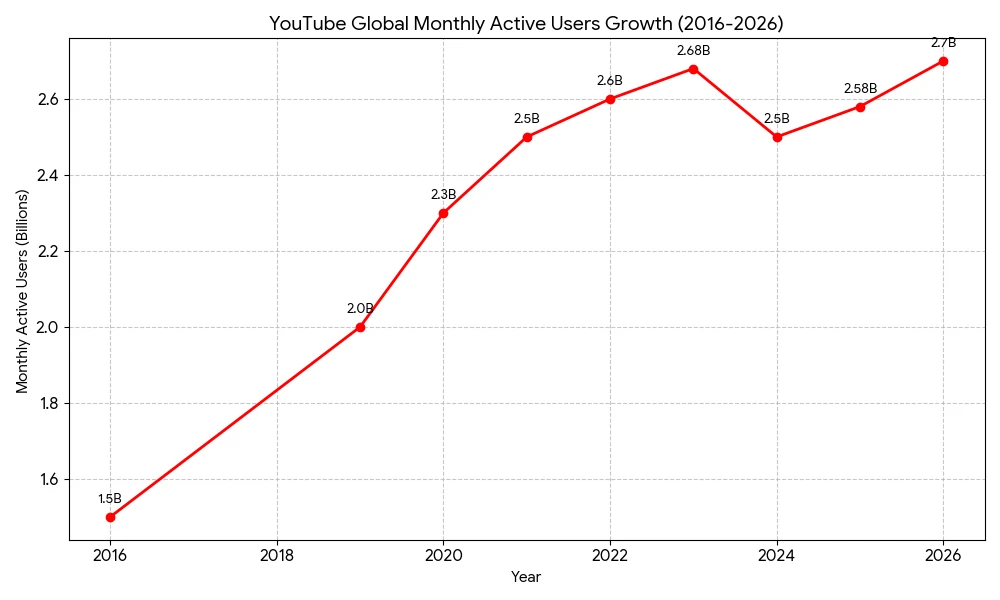
With the steady growth of monthly active users, new opportunities are emerging for affiliate marketers to advertise products on YouTube.
The main challenge is that YouTube has continuously restricted the ability to run free advertising campaigns for affiliate marketers, which limits the number of strategies that can be used on the platform.
However, there are some effective strategies that we will cover in the following sections.
Is affiliate marketing allowed on YouTube?
Before moving on to free advertising strategies on YouTube, you may first ask yourself if affiliate marketing is allowed on the platform for advertising purposes.
The answer is yes!
Most YouTubers have dozens of affiliate links in the description below their videos. These links have generated traffic and earnings for years.
Others go all-in and focus solely on creating promotional videos for products to maximize revenue. These videos usually have a low individual view count, but for them, quantity is the key factor in earnings.
The more interesting part is learning how to correctly embed an affiliate link on YouTube so that it doesn't look like spam. Spam is completely unacceptable on any platform or website, including YouTube.
Let's look at some strategies you can use YouTube to effectively promote an affiliate offer.
Strategy 1: Affiliate link in the video description
This is the absolute classic and the most effective strategy for free advertising on YouTube:
Affiliate link in the video description!
When you publish a video on YouTube, you can add a description. In this description, you can also include affiliate links, which later even become clickable!
Users watch the video, where you mention that the product link is available in the description below. Interested viewers click the link, and if the promoted product meets their needs, this typically generates clicks and revenue.
There are a few rules if you want to successfully use this strategy of free advertising on YouTube:
- The affiliate link must be placed as high as possible, because the description is truncated after a few characters and is only fully visible when clicked.
- The link should not be too long, as long URLs not only look unappealing but can also make users skeptical. Use URL shorteners to create cleaner links, and ideally, choose a tool that also allows you to track clicks.
- Above the link, include a short text that describes its content, as in the example below. Users want to know what the link is about, especially if there are multiple links in the description.
- In the video, you should repeatedly point out that there is a link in the description leading to the product page and encourage viewers to click on it.
- Promote the link separately within the video, as viewers will otherwise try to search for it themselves. This way, you are not only promoting the product but also the link. For example: "If you are interested in product XYZ, you will find the link in the video description below, so you don't need to search for it yourself." This is a simple and highly effective way to advertise the link.
A good description containing an affiliate link can look like this:
Philips 329P9H – buy 32 inch UHD here:
https://www.amazon.de/Philips-329P9H...?tag=affiliate_id
In the description under the video, we have a description of the link at the top and the affiliate link directly below it. This link is always visible when someone views the description of the video.
Also note that some affiliate programs forbid shortening affiliate links, as Amazon does. Make sure to check the program's rules or ask the program manager directly to confirm whether link shortening is allowed.
Strategy 2: Textual promotion in the comments
This strategy is also one of the most effective free ways to advertise on YouTube, using promotional text in comments. However, there is a serious problem:
You cannot use links in comments!
If you try, your comment will not only be deleted by the channel owner, but you also risk having your YouTube account flagged or facing restrictions on the platform.
Once again, you cannot include links in YouTube comments.
The only way comment advertising works is through passive promotion, which works as follows:
- You create a video on a specific topic. For example, you might test a product and follow all the steps described above using the "link in the description" strategy. Alternatively, you can create an informative video that only mentions a product at the end, which also works well for affiliate marketing.
- Next, use YouTube search to find other channels covering the same topic or product as your video, and visit their videos that are related to yours.
- If the comments section is open, write a comment where you first share your opinion on the topic. Then, at the end of the comment, casually mention that you have covered the same topic in one of your recent videos.
- Now, if someone views the video and reads the comments, they may see your comment and notice your mention of your own video. There is a chance they will click on your name, visit your channel, and watch the video you referenced.
Simple and effective: no links, no spam — just a text mention of your video on the same topic.
Strategy 3: Video response or content collaboration
Instead of spamming links on YouTube, add value first, then naturally integrate your promotion. This works much better than just posting a comment.
- Identify relevant videos
Search for YouTube videos closely related to your product. Look for videos with high engagement (lots of views, comments, likes) and active audiences. - Analyze the content
Watch the video fully. Identify pain points or questions the audience has. - Create your own short video or "response" video
Make a short tutorial, tip, or mini-review related to the original video. Example: If the video is "Top 10 Productivity Apps," your video could be "How I Use App X to Save 5 Hours a Week" (affiliate link at the end). - Upload and optimize your video
Use a title that references the original topic (but don't copy verbatim). Add your affiliate link in the description with a compelling CTA (call-to-action). Tag the video with keywords matching the original video for discoverability. - Comment on the original video
Post a comment like: "I made a short tutorial showing a trick that complements this video — link in my description for more tips!" This naturally drives people from the original video to your value-added content without spamming.
This strategy is extremely rare — almost no one uses it — but it is highly effective.
You're not just leaving a random link; you're adding value and attracting curious viewers who already trust the original content creator.
Strategy 4: YouTube playlists
This strategy is so simple and powerful that it's a no-brainer to use it for free advertising on YouTube. Everyone can also create playlists that bundle related videos, which encourages viewers to watch multiple videos in a row and increases exposure for your content.
How to implement step by step:
- Curate a playlist of related videos, including your own content, where your affiliate offer is promoted.
- Example: "Top Productivity Tools 2026" — your video is included with your affiliate CTA.
- Share the playlist externally (Reddit, forums, social media) to boost its visibility.
- YouTube will promote the playlist to users who show a direct interest in the content available in your playlist.
The best thing about this strategy?
Playlists get recommended by YouTube's algorithm, so you can get passive traffic without constantly posting links.
I tested this with a playlist of relaxing music. I added nearly 20 videos to the list and let it run for a few weeks. During that time, it received tens of thousands of views. This proves that YouTube recommends the playlist to its users and effectively does the promotion for us.
To make this strategy most effective, don't add just one of your videos — add multiple. For example, if the playlist contains 10 videos, include three of your own. The other videos in the list should be as popular as possible, as this is the only way to guarantee visibility for the playlist.
If you include only your own videos and your channel is very small with low view counts, the playlist will remain largely invisible on YouTube, since the platform does not promote content that isn't already popular.
Strategy 5: Affiliate link on the profile page (YouTube channel)
As a YouTube user, you automatically have a profile page. On this page, you can define what someone should see when they land there. It is, so to speak, the homepage of your YouTube channel.
You can use your channel page very cleverly for advertising purposes. Add your affiliate offer to the channel description and the link list, making it easily discoverable for anyone viewing your profile.
The next step is to watch videos related to your offer and write short but meaningful comments that are relevant to your affiliate offer. Some viewers will notice your comment, visit your YouTube channel, see the channel description and links, and, in the best case, click on them.
To maximize the profitability of this strategy, create a professional video about the product that is under five minutes long and apply the "link in the description" strategy. Then, set this video as the channel's featured video so that everyone visiting your channel sees it.
That's it! Now go out there and comment on relevant videos to gain visibility and drive clicks to your own YouTube channel.
Conclusion
Every day, millions of people are active on YouTube.
Many of them are looking for information, others for entertainment. Increasingly, YouTube is also used as a source of information. Those who watch videos that are meant to teach something may also be interested in related products.
You can now specifically promote products on YouTube that solve a specific problem. These can be books, software, online courses, and more. Software seems to be very lucrative, but online courses are also very well suited to be marketed with YouTube advertising.
YouTube is a goldmine for making money!
All the strategies I've shared can generate a significant amount of traffic, which you can direct to external pages to promote products, build your email list, and more.
No type of advertising is unsuitable for an affiliate marketer as long as it generates commissions. One thing you should keep in mind with YouTube advertising is that you can build passive income as an affiliate.
For example, if you create your own videos and place an affiliate link in the description below, this advertising will generate clicks and commissions for years. That is passive income in its simplest form!
You just have to make sure that the advertising does not look like spam. If it looks spammy, your links will be deleted, or you may even lose your YouTube account.
The only way to achieve effective and long-term free advertising on YouTube is by providing value on the platform. You must create content that offers something useful or interesting to other YouTube users in order to build traffic. There are hardly any shortcuts left for making money on YouTube as an affiliate.